Choose your text reminders
Kinduty's optional SMS program is operated by Amy Harris, operating as Kinduty. Text setup appears inside a signed-in care team's notification settings when SMS is available. Text reminders are not enabled just by creating an account or verifying a phone number.
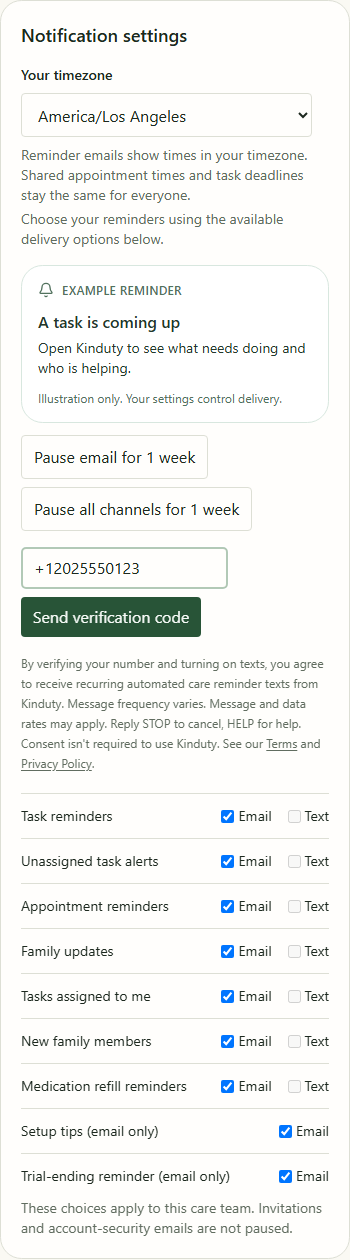
- Sign in, open your care team's Settings, and find Notification settings.
- Read the text consent notice, enter your own phone number, and choose Send verification code to request a one-time code.
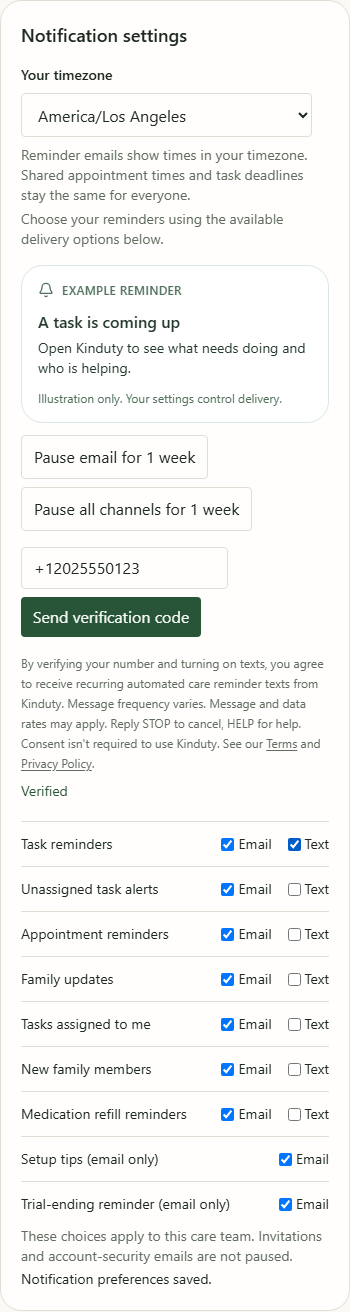
- Enter the code and choose Verify. Text reminder categories remain unchecked.
- Choose Text for each category you want. Your selection saves immediately and the app shows Notification preferences saved.
By verifying your number and turning on texts, you agree to recurring automated care reminder texts from Kinduty. Message frequency varies. Message and data rates may apply. Consent is not required to purchase or use Kinduty. Reply STOP to cancel or HELP for help; contact support@kin-duty.com. See our SMS Terms and Privacy Policy.
Screen examples: These screenshots show the actual Kinduty interface with fictional demonstration data and simulated verification responses. No real phone number, account information, or verification code is published. They document the consent flow; they are not proof of carrier approval or live text delivery. SMS availability depends on registration and deployment.
Change your mind at any time
Uncheck Text categories in notification settings or reply STOP to a Kinduty text to stop messages. Reply HELP for support. Texts use a generic update and app link so care details remain inside your signed-in app. Reminders can be delayed or fail to arrive; do not rely on them for emergencies.